
Showing posts with label SEO. Show all posts
Showing posts with label SEO. Show all posts
How to make video search engine optimization or friendly
Video SEO (Search Engine Optimization)
We know that videos is best platform to learn any tutorials, recipies, technology and use for Entertainment purpose. With the help of best videos you can easily increase your website traffic, viewers and followers. Important factor is in video SEO is no duplicate content issue in any own make videos. If your communication skills is good you can easily grown in video SEO.
How to make Videos SEO Friendly
Important points should be remember for best video Search Engine Optimizaton. These all are here.
1. Seperate videos keywords by hypen sign (-) instead of (_).
2. Promote your website?blog home url at the Strating or End of the videos.

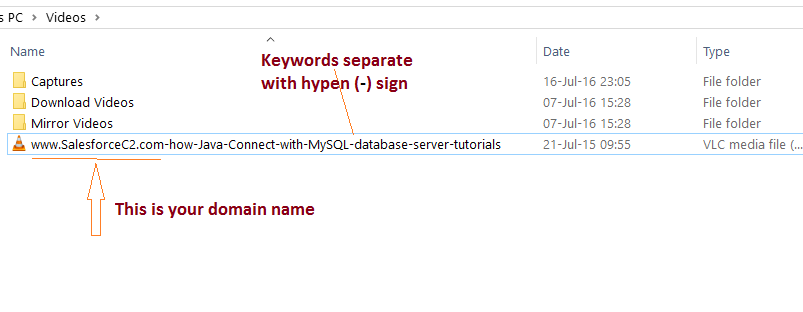
3. Use third party hosting to upload videos ex. Youtube, dailymotion etc.
4. Mention video in the title of the post.


5. Mention about video in the description of the post.
6. Write some text around/near video.
7. In wordpress you can submit video sitemap to search engine.
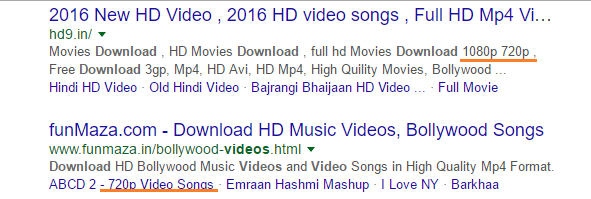
8. You may be define your videos format like 3gp, mp4, HD. Because some viewers search by this if your videos about bollywood, songs, movies etc.


9. Sometime define quality of your videos, that is also increase your website traffic and SEO like HD, 1080p, 720p.

How to use Label and Add Label in Blogger
What is Label
Labels categories your contents in blog. Label is a keywords that's use for make difference between various topics. Labels are use anywhere blog, Website and Niche Blog. Labels search and hold all post to related keywords or topics.
Labels make easily searchable your content and post type in your website or blog. In example we are creating two different types of post title with two different label name
Post title "What is keywords research and how to use in blog Post"
Label name "SEO"
Post title "How to create blog in wordpress and host on server"
Label name "Hosting"
There are two labels SEO and Hosting when user select SEO label than find all post related to SEO either can go to Hosting label for view hosting related post. For easy understanding of label we are given screen shot with example.
Links of your labels search
http://seotrick1.blogspot.in/search/label/SEO
http://seotrick1.blogspot.in/search/label/Hosting
Where: seotrick1.blogspot.in is a blog address
How to use Label in Blogger
Steps for create edit and delete labels in blogger
1. In this step we will create two post title with different labels or category


2. In this step we can see that our created labels Hosting and SEO. So labels are created in blogger


3. How to add labels or categories gadgets in blogger
Steps for create labels gadgets in blogger
1. Go to layout section in Blogger Dashboard


2. And click +Add a Gadgets you can see a new popup window

3. Select labels according to this screen shot and click + Button


4. You can edit your option like Title, Show, Display etc.


5. Finally labels Gadgets show in our blog. See this screen shot.

What is Keywords Research? Google keywords planner tool Guide
What is Keywords Research
Keywords Research is all about content and post description.
It is important topic in SEO world content, and fundamental part of online or
digital marketing. With the help of keyword research we can assume keyword
traffic of a particular search engine or a particular domain in any category
like technology, science, movies, music,
videos, software, computer etc.
1. Understand Your Business
2. Understand Your Brand
3. Understand Your Products
4. Understand Your Topics
5. Follow keywords research methods

Keyword Research Process
2. Understand Your Brand
3. Understand Your Products
4. Understand Your Topics
5. Follow keywords research methods

Keywords Research Types or method
Many SEO experts works mainly four types of keywords
Research for search engine optimization
in any website, blog or pages. These all are following.
1. By Search Engine Recommendation
Yes, when we enter any keyword in search engine search engine recommend extra words for search preference
Example : if you type “download facebook app” in search engine
Search engine recommend
“download facebook app for android”
“download facebook app for pc”
“download facebook app for blackberry”
“download facebook app for java”


2. By using Highlighted Searches
Yes this is another keywords research method in which collect keywords by search engine results pages.
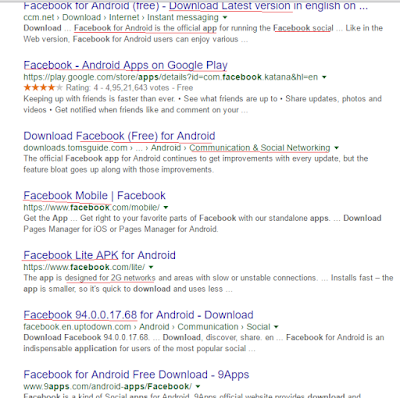

3. By using SEO Based Searches
In which methods collect keywords by botttom of search engine pages like google gives results in bottom of pages, searches related to download facebook app.
Like :”download facebook app for android, download facebook messaenger, download facebook app for android phones, download facebook app for samsung, download facebook app for pc, download facebook app for iphone, Facebook login” etc.


4. Keywords Planner Tool
Keywords planner is a tool that’s use for see keywords research, traffic, keywords statics of any website may be use by category or location. Keywords tool also useful for build advertise purpose. You can see more about keywords planner tool below headings.
Must Read
Must Read
Keywords
Research Tool for SEO
There are various keywords
research tool available for SEO and Advertising. But in post we will understand
google Adwords keyword planner tool.
How to use google adwords keyword planner tool
1. Go to Google adwords
keyword planner tool by the url https://adwords.google.com/ko/KeywordPlanner/Home

2. Login to your google account and see this page and click first option search for new keywords using phrase, website or category.

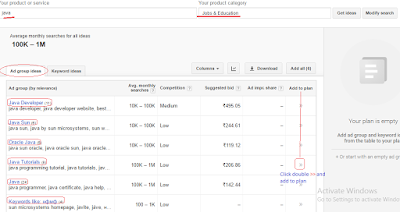
3. In this step we enter our product or service like “java” and landing page like your competitor website or top website in this service. We enter a java tutorial website http://wwwjavatpoint.com and 3rd option is product category, like software, SEO, computer, web application. We are collect info about “web application” java service. Click get ideas.

4. This steps show two keywords idea “java documentation, web java”.

5. If you wants collect all keywords of this category modify searches and remove landing pages and also change categories.


2. Login to your google account and see this page and click first option search for new keywords using phrase, website or category.

3. In this step we enter our product or service like “java” and landing page like your competitor website or top website in this service. We enter a java tutorial website http://wwwjavatpoint.com and 3rd option is product category, like software, SEO, computer, web application. We are collect info about “web application” java service. Click get ideas.

4. This steps show two keywords idea “java documentation, web java”.

5. If you wants collect all keywords of this category modify searches and remove landing pages and also change categories.

6. New results are show
keywords about service java and
category jobs & education.We
can also see ad group ideas keywords are related to “
java developer, java sun, oracle java, java tutorials, java ”. You just click on avg. monthly
searches high like java & java
tutorial. For see all keywords of sub category just click on right side of
page add to plan (according to our screenshot).
7. In the right sidebar
java tutorial highlighted and click on clip board for see keywords (you can
also download CSV file of related keywords).

Subscribe to:
Posts
(
Atom
)

 Posts
Posts

